来来来来来了
甜筒
用户 ID 2780 · 当前名首次快照 2026-08-12 10:14:34 · 当前名始于 2026-08-12 10:14:34 · 原站主页: https://linux.sb/user/2780
发言
共 29 楼
BGP直连大陆优化 是什么
dedirock 9.88 自己搜关键词
目前还是可以使用的 理论上 只要key不过期 都不需要重新登陆 这么好的帖子为什么没人点赞 😡
还有创建key报错就是被风控了 直接换号吧
已成功兑换虚拟卡「软件下载链接」。
@yym #6 x上一大推喷不重置team的
充值卡都消失了 还不重置 我4个team 服了
句句在理
那咋啦
@xh123 #11 天呐 那不如我发出来干什么
@xh123 #8 不接码使用codex
@冷晨 #5 除了重置 全部一切正常
@nidemod #2 修复了我发出来干嘛 没修复没修复!
功能说明
这个油猴脚本可以在 ChatGPT 页面读取当前登录会话的信息,并把 Team Access Token 生成成可导入 Sub2API 的 JSON 文件。
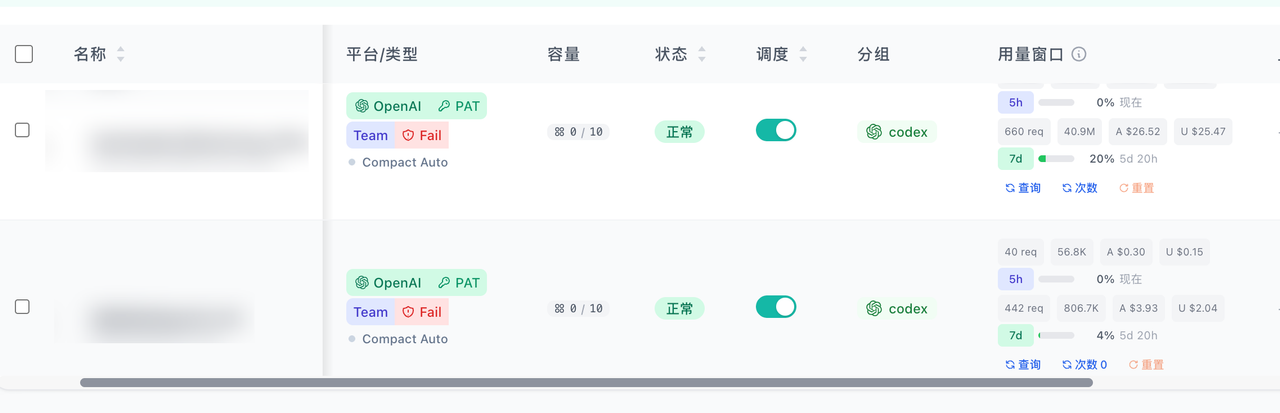
导入 Sub2API 后,可以:
- 查询额度
- 查询使用次数
目前不能直接在 Sub2API 中重置;如需重置,请前往 ChatGPT 使用session自行重置。
使用方法
- 安装 Tampermonkey(油猴)扩展。
- 新建脚本,将下方完整代码粘贴进去并保存。
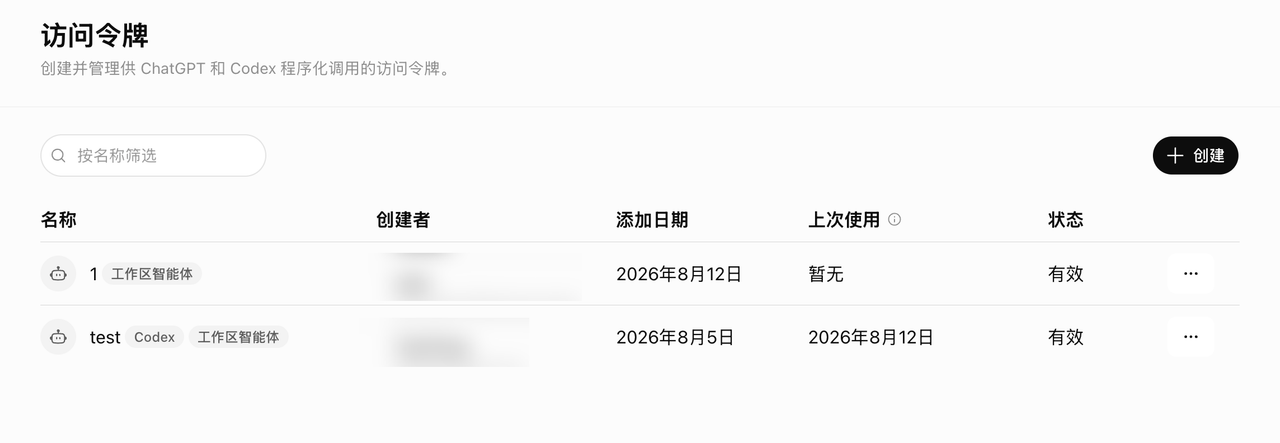
- 登录 ChatGPT,创建一个 Team Access Token。访问令牌的创建步骤这里不再展开。
- 打开 ChatGPT 页面,点击右下角的 Sub2API 导出按钮。
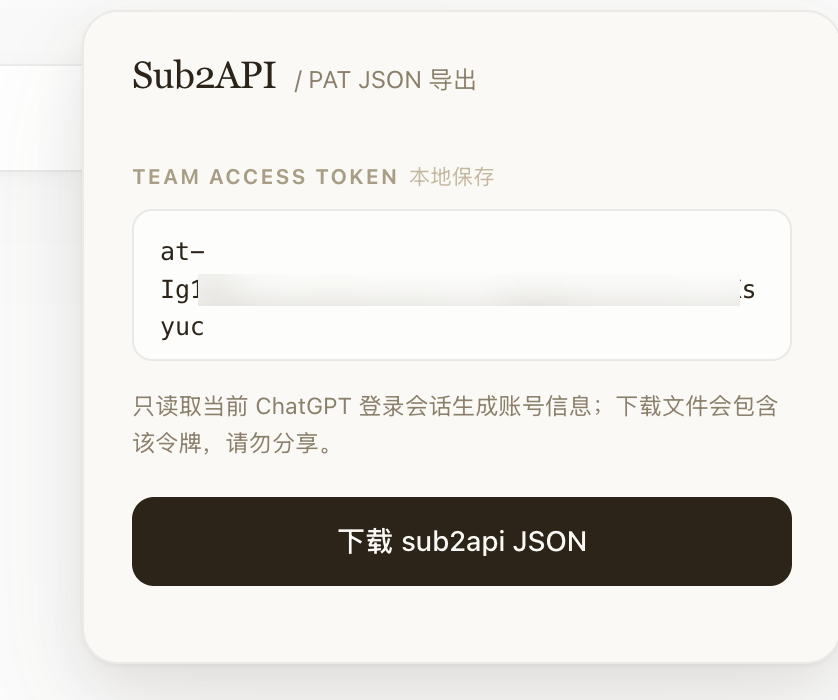
- 粘贴以
at-开头的 Team Access Token,点击“下载 sub2api JSON”。脚本会直接导出可供 Sub2API 导入的 JSON 文件,不需要手动转换格式。
- 将下载的 JSON 文件直接导入 Sub2API。
导入后显示效果如下:
注意事项
- 访问令牌和导出的 JSON 都属于敏感信息,请勿分享。
- 脚本会在本地保存你输入的 Team Access Token。
- Sub2API 中可以查询额度和使用次数,但当前不能重置;
油猴脚本
// ==UserScript==
// @name GPT TEAM Sub2API 导出器
// @namespace http://tampermonkey.net/
// @version 1.0.1
// @description 在 ChatGPT 页面输入 Team 访问令牌并下载 sub2api JSON
// @author Codex
// @match https://chatgpt.com/*
// @match https://chat.openai.com/*
// @grant GM_setValue
// @grant GM_getValue
// @run-at document-idle
// ==/UserScript==
(function () {
'use strict';
const TOKEN_KEY = 'sub2api_team_access_token';
const BTN_ID = '__sub2api_pat_btn__';
const PANEL_ID = '__sub2api_pat_panel__';
const STYLE_ID = '__sub2api_pat_style__';
const TOKEN_ID = '__sub2api_pat_token__';
const DOWNLOAD_ID = '__sub2api_pat_download__';
const RESULT_ID = '__sub2api_pat_result__';
const ICON_JSON_DOWNLOAD = `
<svg viewBox="0 0 24 24" fill="none" xmlns="http://www.w3.org/2000/svg">
<path d="M7 3.75h7.25L19 8.5v11.75H7a2 2 0 0 1-2-2V5.75a2 2 0 0 1 2-2Z" stroke="currentColor" stroke-linejoin="round"/>
<path d="M14 3.75V8.5h5" stroke="currentColor" stroke-linejoin="round"/>
<path d="M12 10.75v5.5M9.75 14l2.25 2.25L14.25 14" stroke="currentColor" stroke-linecap="round" stroke-linejoin="round"/>
<path d="M8.5 10.25c-1.1.55-1.1 2.95 0 3.5M15.5 10.25c1.1.55 1.1 2.95 0 3.5" stroke="currentColor" stroke-linecap="round"/>
</svg>
`;
const CSS = `
#${BTN_ID} {
position: fixed;
right: 28px;
bottom: 76px;
z-index: 999998;
width: 36px;
height: 36px;
padding: 0;
border: 0;
background: transparent;
color: #6b6354;
cursor: pointer;
opacity: .72;
display: flex;
align-items: center;
justify-content: center;
transition: color .22s ease, transform .35s cubic-bezier(.34,1.56,.64,1), opacity .22s ease;
}
#${BTN_ID}:hover,
#${BTN_ID}.is-open {
color: #c96442;
opacity: 1;
}
#${BTN_ID}:hover { transform: rotate(-12deg) scale(1.12); }
#${BTN_ID} svg { width: 26px; height: 26px; stroke-width: 1.6; }
#${PANEL_ID} {
position: fixed;
right: 28px;
bottom: 124px;
z-index: 999997;
width: 380px;
max-width: calc(100vw - 32px);
background: #faf9f5;
border: 1px solid rgba(0,0,0,.06);
border-radius: 18px;
box-shadow: 0 1px 2px rgba(0,0,0,.04), 0 8px 24px rgba(0,0,0,.06), 0 24px 60px rgba(60,40,20,.10);
color: #2c2419;
font: 14px/1.45 ui-sans-serif, system-ui, -apple-system, BlinkMacSystemFont, "Segoe UI", sans-serif;
letter-spacing: -.005em;
transform: translateY(8px) scale(.985);
opacity: 0;
pointer-events: none;
transition: transform .28s cubic-bezier(.34,1.2,.64,1), opacity .22s ease;
}
#${PANEL_ID}.open {
transform: translateY(0) scale(1);
opacity: 1;
pointer-events: auto;
}
#${PANEL_ID} .s2a-header {
padding: 22px 24px 14px;
display: flex;
align-items: baseline;
gap: 9px;
}
#${PANEL_ID} .s2a-title {
font-family: Georgia, "Times New Roman", serif;
font-size: 19px;
font-weight: 500;
line-height: 1;
color: #2c2419;
letter-spacing: -.018em;
}
#${PANEL_ID} .s2a-subtitle { font-size: 12px; color: #8a7f6a; }
#${PANEL_ID} .s2a-body { padding: 0 24px 24px; }
#${PANEL_ID} .s2a-label {
margin: 18px 0 9px;
color: #a89c85;
font-size: 10.5px;
font-weight: 650;
letter-spacing: .09em;
text-transform: uppercase;
}
#${PANEL_ID} .s2a-label span {
margin-left: 5px;
color: #c4b8a0;
font-weight: 400;
letter-spacing: 0;
text-transform: none;
}
#${TOKEN_ID} {
width: 100%;
box-sizing: border-box;
height: 76px;
padding: 11px 13px;
border: 1px solid rgba(0,0,0,.08);
border-radius: 10px;
outline: 0;
resize: none;
background: rgba(255,255,255,.6);
color: #2c2419;
font: 12.5px/1.5 "SF Mono", ui-monospace, Menlo, Consolas, monospace;
transition: border-color .18s ease, box-shadow .18s ease, background .18s ease;
}
#${TOKEN_ID}::placeholder { color: #b8ac95; }
#${TOKEN_ID}:focus {
border-color: rgba(201,100,66,.40);
background: #fff;
box-shadow: 0 0 0 3px rgba(201,100,66,.08);
}
#${PANEL_ID} .s2a-hint {
margin-top: 8px;
color: #8a7f6a;
font-size: 11.5px;
line-height: 1.6;
}
#${DOWNLOAD_ID} {
width: 100%;
margin-top: 18px;
padding: 12px 0;
border: 0;
border-radius: 11px;
background: #2c2419;
color: #faf9f5;
font: inherit;
font-weight: 500;
cursor: pointer;
display: flex;
justify-content: center;
align-items: center;
gap: 8px;
transition: background .18s ease, transform .18s ease, box-shadow .18s ease, opacity .18s ease;
}
#${DOWNLOAD_ID}:hover {
background: #1a140b;
transform: translateY(-1px);
box-shadow: 0 6px 16px rgba(44,36,25,.20);
}
#${DOWNLOAD_ID}:disabled {
opacity: .55;
cursor: not-allowed;
transform: none;
box-shadow: none;
}
#${PANEL_ID} .s2a-spinner {
width: 13px;
height: 13px;
border: 1.8px solid rgba(250,249,245,.30);
border-top-color: #faf9f5;
border-radius: 50%;
animation: s2a-spin .65s linear infinite;
}
@keyframes s2a-spin { to { transform: rotate(360deg); } }
#${RESULT_ID} { margin-top: 14px; }
#${PANEL_ID} .s2a-result {
padding: 10px 13px;
border-radius: 11px;
font-size: 12px;
line-height: 1.55;
word-break: break-word;
}
#${PANEL_ID} .s2a-ok {
color: #1f8556;
background: rgba(34,139,90,.05);
border: 1px solid rgba(34,139,90,.18);
}
#${PANEL_ID} .s2a-error {
color: #c83737;
background: rgba(200,55,55,.04);
border: 1px solid rgba(200,55,55,.18);
}
@media (prefers-color-scheme: dark) {
#${BTN_ID} { color: #b8ac95; }
#${BTN_ID}:hover,
#${BTN_ID}.is-open { color: #e8a07d; }
#${PANEL_ID} {
background: #1f1c17;
border-color: rgba(255,255,255,.08);
color: #e8e1d2;
box-shadow: 0 1px 2px rgba(0,0,0,.3), 0 12px 32px rgba(0,0,0,.4), 0 24px 60px rgba(0,0,0,.5);
}
#${PANEL_ID} .s2a-title { color: #f0e8d6; }
#${PANEL_ID} .s2a-subtitle { color: #8a7f6a; }
#${PANEL_ID} .s2a-label { color: #6b6354; }
#${PANEL_ID} .s2a-label span { color: #4d463a; }
#${TOKEN_ID} {
background: rgba(0,0,0,.18);
border-color: rgba(255,255,255,.08);
color: #e8e1d2;
}
#${TOKEN_ID}::placeholder { color: #6b6354; }
#${TOKEN_ID}:focus {
border-color: rgba(232,160,125,.4);
background: rgba(0,0,0,.25);
box-shadow: 0 0 0 3px rgba(232,160,125,.10);
}
#${PANEL_ID} .s2a-hint { color: #8a7f6a; }
#${DOWNLOAD_ID} { background: #f0e8d6; color: #1f1c17; }
#${DOWNLOAD_ID}:hover { background: #fff; box-shadow: 0 6px 16px rgba(0,0,0,.4); }
#${PANEL_ID} .s2a-spinner {
border-color: rgba(31,28,23,.25);
border-top-color: #1f1c17;
}
#${PANEL_ID} .s2a-ok {
color: #5dc88f;
background: rgba(64,180,120,.07);
border-color: rgba(64,180,120,.22);
}
#${PANEL_ID} .s2a-error {
color: #e57373;
background: rgba(220,80,80,.07);
border-color: rgba(220,80,80,.22);
}
}
`;
function inject() {
if (!document.body || document.getElementById(BTN_ID)) return;
if (!document.getElementById(STYLE_ID)) {
const style = document.createElement('style');
style.id = STYLE_ID;
style.textContent = CSS;
document.head.appendChild(style);
}
const btn = document.createElement('button');
btn.id = BTN_ID;
btn.type = 'button';
btn.title = 'Sub2API PAT JSON 导出器';
btn.innerHTML = ICON_JSON_DOWNLOAD;
document.body.appendChild(btn);
const panel = document.createElement('div');
panel.id = PANEL_ID;
panel.innerHTML = `
<div class="s2a-header">
<div class="s2a-title">Sub2API</div>
<div class="s2a-subtitle">/ PAT JSON 导出</div>
</div>
<div class="s2a-body">
<div class="s2a-label">Team Access Token<span>本地保存</span></div>
<textarea id="${TOKEN_ID}" placeholder="粘贴 at- 开头的 Team 访问令牌" spellcheck="false"></textarea>
<div class="s2a-hint">只读取当前 ChatGPT 登录会话生成账号信息;下载文件会包含该令牌,请勿分享。</div>
<button id="${DOWNLOAD_ID}" type="button"><span>下载 sub2api JSON</span></button>
<div id="${RESULT_ID}"></div>
</div>
`;
document.body.appendChild(panel);
bindEvents(btn, panel);
}
function bindEvents(btn, panel) {
const input = panel.querySelector(`#${TOKEN_ID}`);
const downloadBtn = panel.querySelector(`#${DOWNLOAD_ID}`);
input.value = GM_getValue(TOKEN_KEY, '');
btn.addEventListener('click', () => {
const open = !panel.classList.contains('open');
panel.classList.toggle('open', open);
btn.classList.toggle('is-open', open);
});
input.addEventListener('input', () => {
GM_setValue(TOKEN_KEY, input.value.trim());
});
downloadBtn.addEventListener('click', async () => {
const token = input.value.trim();
GM_setValue(TOKEN_KEY, token);
if (!token || !token.startsWith('at-')) {
showResult('Team 访问令牌必须是 at- 开头', true);
return;
}
setBusy(downloadBtn, true);
try {
const output = await buildSub2apiJson(token);
downloadJson(output, `${safeFilename(output.accounts[0].name)}.pat.sub2api.json`);
console.log('sub2api PAT 导出成功:', output);
showResult(`已下载:${output.accounts[0].name}.pat.sub2api.json`, false);
} catch (err) {
console.error('导出 sub2api PAT JSON 失败:', err);
showResult(err.message || String(err), true);
} finally {
setBusy(downloadBtn, false);
}
});
}
async function buildSub2apiJson(teamToken) {
const response = await fetch('/api/auth/session', { credentials: 'include' });
if (!response.ok) throw new Error(`ChatGPT session 获取失败:HTTP ${response.status}`);
const data = await response.json();
if (!data?.accessToken) throw new Error('未获取到 ChatGPT session accessToken,请确认已登录 ChatGPT');
const payload = decodeJwtPayload(data.accessToken);
const auth = payload['https://api.openai.com/auth'] || {};
const profile = payload['https://api.openai.com/profile'] || {};
const account = data.account || data.accounts?.find((item) => item?.id === auth.chatgpt_account_id) || data.accounts?.[0] || {};
const now = new Date();
const email = first(data.user?.email, profile.email, auth.email);
const accountId = first(account.id, auth.chatgpt_account_id, auth.account_id);
const userId = first(data.user?.id, auth.chatgpt_user_id, auth.user_id, payload.sub);
const planType = first(account.planType, account.plan_type, auth.chatgpt_plan_type, auth.plan_type);
if (!email) throw new Error('缺少 email');
if (!accountId) throw new Error('缺少 chatgpt_account_id');
if (!userId) throw new Error('缺少 chatgpt_user_id');
if (!planType) throw new Error('缺少 plan_type');
return {
exported_at: now.toISOString(),
proxies: [],
accounts: [
{
name: email,
platform: 'openai',
type: 'oauth',
auto_pause_on_expired: false,
concurrency: 10,
priority: 1,
credentials: {
access_token: teamToken,
token_type: 'Bearer',
auth_mode: 'personalAccessToken',
openai_auth_mode: 'personal_access_token',
chatgpt_account_id: accountId,
chatgpt_user_id: userId,
email,
plan_type: planType,
},
extra: {
email,
email_key: toEmailKey(email),
name: email,
auth_provider: 'codex_personal_access_token',
source: 'chatgpt_web_session_with_codex_pat',
last_refresh: localTimestamp(now),
},
},
],
};
}
function decodeJwtPayload(token) {
try {
const payload = token.split('.')[1];
if (!payload) throw new Error();
const base64 = payload.replace(/-/g, '+').replace(/_/g, '/');
const padded = base64 + '='.repeat((4 - (base64.length % 4)) % 4);
const bytes = Uint8Array.from(atob(padded), (char) => char.charCodeAt(0));
return JSON.parse(new TextDecoder().decode(bytes));
} catch (_) {
throw new Error('ChatGPT session accessToken 解析失败');
}
}
function downloadJson(data, filename) {
const blob = new Blob([JSON.stringify(data, null, 4)], { type: 'application/json' });
const url = URL.createObjectURL(blob);
const link = document.createElement('a');
link.href = url;
link.download = filename;
document.body.appendChild(link);
link.click();
link.remove();
setTimeout(() => URL.revokeObjectURL(url), 1000);
}
function first(...values) {
return values.find((value) => value !== undefined && value !== null && value !== '');
}
function setBusy(button, busy) {
button.disabled = busy;
button.innerHTML = busy ? '<span class="s2a-spinner"></span><span>生成中</span>' : '<span>下载 sub2api JSON</span>';
}
function showResult(message, isError) {
const result = document.getElementById(RESULT_ID);
if (!result) return;
result.innerHTML = `<div class="s2a-result ${isError ? 's2a-error' : 's2a-ok'}">${escHtml(message)}</div>`;
}
function localTimestamp(date) {
const pad = (n) => String(n).padStart(2, '0');
const tzOffset = -date.getTimezoneOffset();
const sign = tzOffset >= 0 ? '+' : '-';
const offsetHours = pad(Math.floor(Math.abs(tzOffset) / 60));
const offsetMinutes = pad(Math.abs(tzOffset) % 60);
return (
`${date.getFullYear()}-${pad(date.getMonth() + 1)}-${pad(date.getDate())}` +
`T${pad(date.getHours())}:${pad(date.getMinutes())}:${pad(date.getSeconds())}` +
`${sign}${offsetHours}:${offsetMinutes}`
);
}
function toEmailKey(email) {
return email.replace(/[^a-zA-Z0-9]/g, '_');
}
function safeFilename(value) {
return String(value).replace(/[\\/:*?"<>|]/g, '_');
}
function escHtml(value) {
return String(value)
.replace(/&/g, '&')
.replace(/</g, '<')
.replace(/>/g, '>')
.replace(/"/g, '"');
}
inject();
setInterval(inject, 1500);
})();最后由 甜筒 编辑于 2026-08-12 12:23
本来想开通几个 pro20x ,开月卡中转站的,但是想想还是算了。
8.12 今日开通,可以使用我的三网优化的 sub2api 。
来,截图实锤
肯定有人要啊 当时印区grok 49米三个月在哪都买不到 印度苹果id 虽然自己注册也简单 但还是想用钱买时间
我是山东的 我申请入编制
@夏天 你夏天哥喊你改名呢 说的就是你 刘邦
我们这边都是抽奖的
康神开播了