@偶尔路过的NPC #7 YES 图片是飞书存储的,那还是登录一下吧
kkget
用户 ID 21743 · 当前名首次快照 2026-08-17 20:13:07 · 当前名始于 2026-08-17 20:13:07 · 原站主页: https://linux.sb/user/21743
发言
共 20 楼
@超高校级交易员 #5 H3更适合 H3的官方SKILL 动画特效更佳
@羊羊羊 #1 是捏 今天完成了收购 cursor挺好用
神仙打架,MinimaxH3还在开源2K视频中,原生4K的Ltx2.5深夜开源了,哇哦。如果4k又能更快,更稳定,那才更好,相信最近会有加速插件,量化模型跟上,最喜欢看开源社区发力了,期待哪天原生4K 5秒就能出1分钟视频才好。
我去查询MinimaxH3参数量是33B,本次的Ltx2.5有22B的参数量【PS这两个是我自己查询不是官方数据】这么一比可能Ltx2.5在某些方面稍加逊色,但是解决了ltx2.3不太清晰的问题,可以支持一次生成多个连续镜头,人物、场景、声音跨镜头保持一致性,无需后期拼接,提示词理解能力主要依赖于gemma4模型。
先说结论:又快,有高清,要是MinimaxH3有这么快就好了,5秒的视频,1280*736 分辨率只需要121秒图片,15秒视频生成完毕只需要314秒。
官方示例
如何在本地使用?一步一步带你制作第一个Ltx2.5视频
1.下载comfyui整合包
Comfyui ltx2.5工作流以及整合包链接:https://pan.quark.cn/s/4f19adda4ddc
2.更新到最新版本0.32.0+
3.拖入工作流
4.下载模型以及存放位置
工作流注意事项
1.分辨率和像素在这里调整
时长和帧率在这里,先跑5秒看看效果,满意了再跑15秒的
3.注意官方最低使用蒸馏后disstill模型16G显存可用,用 distilled 模型 + FP8/INT8 量化 + 降低分辨率(540p–720p)+ 缩短时长(3–5秒)可以降低到12G
4.模型也下载好了,工作流也拖入进来了,那么怎么样的提示词才能更好的发挥ltx2.5的效果呢?
官方提示词指南
一、核心原则
写提示词时,要像摄影师在描述镜头一样,用流畅的自然语言把完整画面讲清楚。 LTX-2.5 最擅长:单一主体、清晰运镜、统一光影、明确音频的电影感场景。
通用规则:
用现在时描述动作
写成一段流畅的段落(不要关键词堆砌)
场景聚焦:少而清晰的人物和动作,比拥挤画面效果更好
光影统一:每个镜头保持一种合理的光源逻辑
先写核心,再逐步加细节迭代
二、提示词必须包含的 6 大要素
Establish the Shot(确立镜头)
使用电影术语:特写、中景、全景、过肩等,匹配你想要的风格。
Set the Scene(设定场景)
描述灯光、色调、表面纹理、氛围,建立情绪和调性。
Describe the Action(描述动作)
按时间顺序写自然动作,从开始到结束流畅连贯。
Define the Character(s)(定义人物)
年龄、发型、服装、明显特征。情绪用身体动作表达,不要直接写“sad / angry”。
Identify Camera Movement(s)(运镜)
明确怎么动、什么时候动,以及运动后画面变成什么样。
Describe the Audio(音频)
环境音、音乐、对白、歌唱。
对白用引号包起来
可指定语言和口音
三、结构写法
- 单镜头(Single-Shot)——最常用
写成一段流畅段落
约 4–8 句描述
细节程度匹配镜头尺度(特写要精细,全景可概括)
运镜相对主体来描述
示例结构:
[镜头类型] + [场景与光影] + [人物外貌与动作] + [运镜] + [音频与对白]
- 长场景 / 剧本风格(Screenplay-Style)
适合有对白、多节拍、精确时间的场景。 可使用场景标题、角色提示、引号对白,但仍然保持现在时和物理情绪表达。
- 多镜头(Multi-Shot)——LTX-2.5 新能力
一次生成 2–4 个镜头,并保持人物/场景/声音一致性。
必须做的事:
用自然语言明确写出转场(例:A hard cut transitions to… / A match cut connects…)
每个新镜头重新建立构图、角度、人物、光影
重复出现的人物用相同视觉标识(例:the woman in the yellow raincoat)
明确音频是否跨镜头连续(例:the synth score continues across the cut)
多镜头示例(官方):
A wide shot frames a rainy city intersection at dusk, neon signs reflecting on wet asphalt. A young woman in a yellow raincoat walks toward camera, gripping a folded newspaper, while cars hiss past behind her. Soft synth music and distant traffic fill the air. A hard cut transitions to a medium close-up of her face under the hood, raindrops catching the neon as she looks off-screen left; the synth score continues across the cut, traffic muffled. She whispers, “He’s late.” Another hard cut jumps to a low-angle shot of a man’s scuffed boots stepping into a puddle at the curb; the music drops to a low drone. He lifts his head into frame — short dark hair, soaked jacket — and smiles toward her off-screen as a bus rumbles past.
建议: 优先 2–4 个镜头,每个镜头职责清晰(建立→细节→反应)。
四、特殊功能提示词
Dub-It(配音 / 替换对白)
模板:
text
[Speaker] is speaking [Language/Accent], saying: "[完整对白]"
要求:
提供完整对白原文(模型不会自动翻译)
用目标语言的原生文字(俄语用西里尔字母等)
目前验证语言:英语、法语、西班牙语、德语、俄语
只支持单人说话
对白长度尽量匹配原片时长(略长好于太短)
图生视频(Image-to-Video)
优先用单连续镜头。 可在提示词开头加:“Use the provided start image as the first frame”,再描述后续动作与运镜。
五、模型仍不太稳定的点
屏幕文字
:短文字有改善,但拼写和跨帧一致性不保证,重要文字建议后期添加。
复杂物理
:高度混乱的运动容易出伪影,日常合理动作更可靠。
六、常用术语参考(可直接抄用)
镜头语言:Follows / Tracks / Pans across / Circles around / Tilts upward / Pushes in / Pulls back / Overhead view / Handheld / Over-the-shoulder / Wide establishing shot / Static frame
灯光:Flickering candles / Neon glow / Natural sunlight / Dramatic shadows
氛围:Fog / Rain / Dust / Smoke / Particles
音频:Coffeeshop noise / Wind and rain / Forest ambience with birds / Whisper / Shout
风格:Film grain / Lens flares / Depth of field / Slow motion / Time-lapse
是的,原生模型就支持了NSFW,你可以写任意词汇,另外也放入了专门为NSFW模型训练的模型
目前个人测试了大量的TTS产品,
1.Fish Speech S2 Pro
2.VoxCPM2 【清华面壁智能公司】
3.OmniVoice【小米公司】
4.Qwen3-TTS 【阿里千问】
5.index TTS2.5 【B站出品】
在开源的榜单上Fish Speech S2 Pro综合能力最强,index TTS2.5目前速度最快,
全球开源音频榜单:https://artificialanalysis.ai/text-to-speech/leaderboard/provider-voice?open-weights=true
大佬可以看看这个文章的语音测试样本,有windows整合包,由于涉及到大量的语音样本展示,请大佬们移步这里测试结果
https://mp.weixin.qq.com/s/xvae23ZGCttYC0jDx-rR2g
我补一下:官方给到是3060 12G显存最低就可以跑
这是一个节点,我已经把工作流连好了,如果在视频教程中可以看到,直接拖进去就能用了
16G有下载Q3KM,有一定的精度损失
首先对不熟悉的小伙伴说一下,这并不是一家寂寂无名的公司,而是海螺视频,星野app和Minimax模型的同一家公司的产物。虽然seedance效果很好,但是seedance 2.5实在太贵了。本次的H3开源是卖点之一,我相信在官网的全量模型表现更好,但是可以在3060上运行的2K视频模型简直太可了。
图文说明:
https://mp.weixin.qq.com/s/A_7_Bu_YD3b4d2GAhyvBcA
视频效果本地制作无剪辑
这里是视频
这里是视频
【文末分型第二个视频的提示词】
那么视频已经开放了,也可以本地运行了,那么怎么写提示词才能更好的做出最佳视频效果?Workbuddy如何一键生成AI视频提示词?
视频教程
链接文字
目录
1.开始使用以及工作流模型下载
2.Workbuddy使用官方skill一键生成AI视频提示词
3.测试效果
1.更新Comfyui桌面版到最新版本0.30.0 +
注意:网上的什么完全体,什么V8什么V9版本的都没用,整合包只认准官方包即可
https://comfy.org/download
2.下载工作流
链接:https://pan.quark.cn/s/dfbd213dec24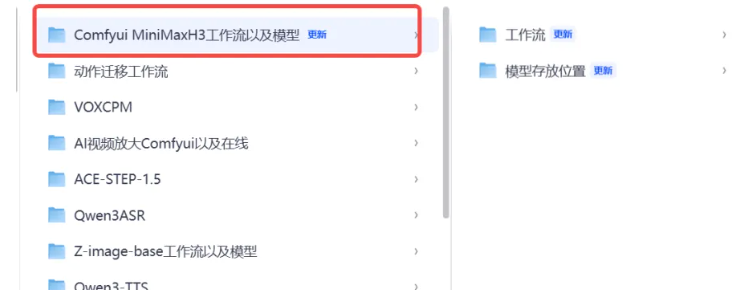
3.拖入工作流
链接文字
4.本地下载一个workbuddy,一键安装官方skill,大模型可以免费用
发送给下面内容
安装这个skill:https://github.com/MiniMax-AI/MiniMax-H3/tree/main/skills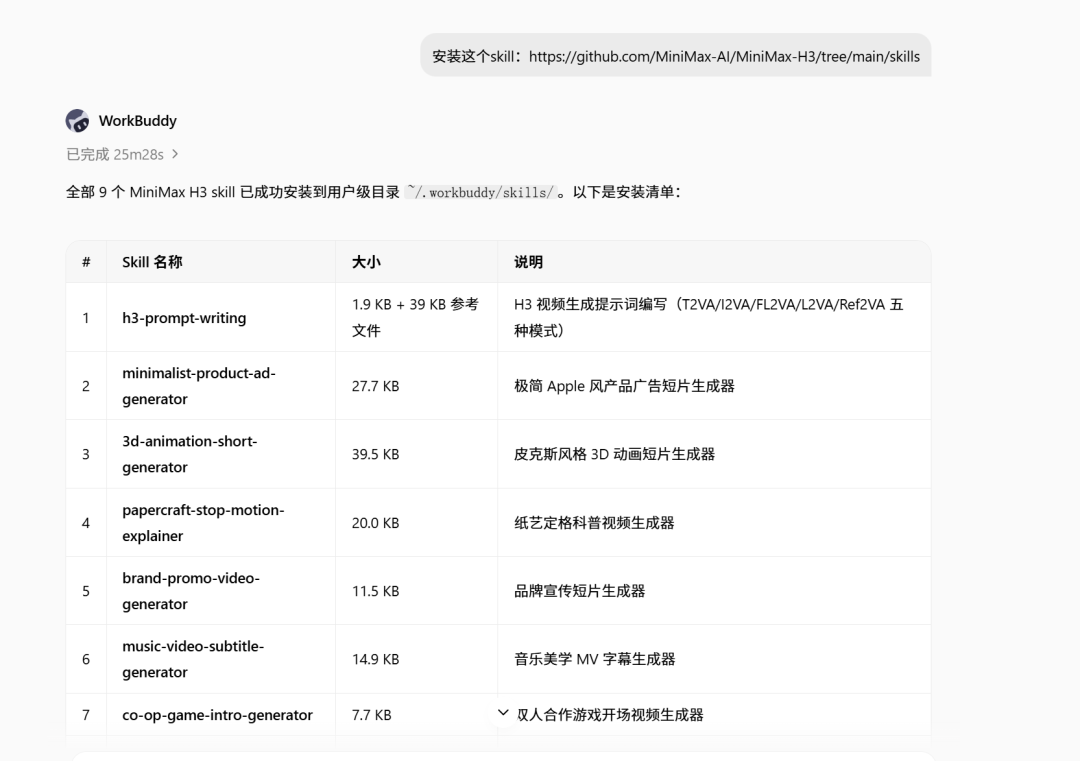
这样就能实现可以遵循官方提示词规则的生成模板。如果你安装了以上skill,就可以比手动写提示词更加的规范和提高遵守能力。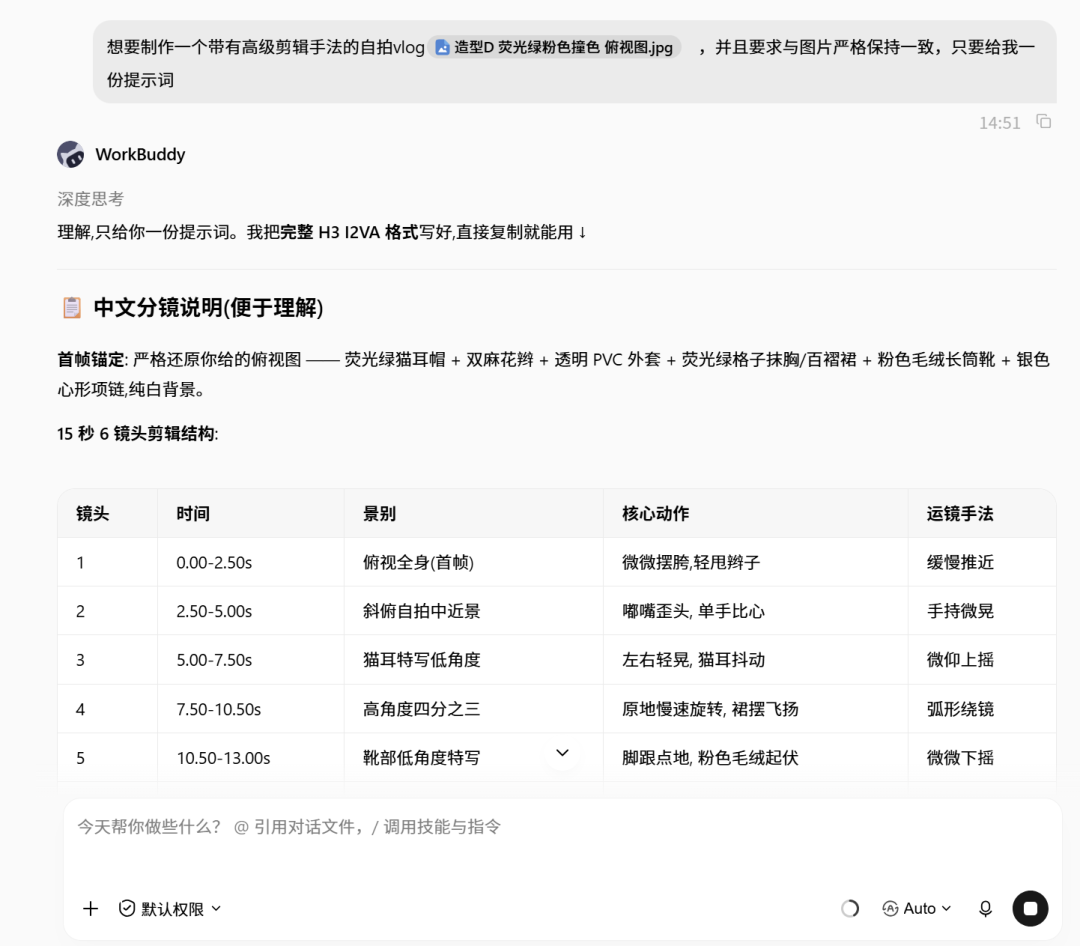
怎么写的?
这种提示词写法属于「结构化分镜式视频提示词」,核心特点是把一段视频拆解成「全局规则 + 角色锁定 + 视觉系统 + 分镜清单」四层结构,既保证风格统一,又方便模型执行。
下面我帮你拆解它的底层逻辑,并给你一套可以直接复用的「写作规则」,以后你只要把这套规则发给 AI,它就能稳定写出同样风格的提示词。
一、这种提示词的核心结构(必须遵守)
全局风格定义
(第一段)
用 2–4 句话高度概括整体美学、情绪、质感、材质。
关键词要密集、有画面感(例:Soft cute Y2K crush、Dopamine、candy glossy、35mm film grain…)。
角色锁定段落
(第二段)
明确「一个人 / 几个人」。
强制写死外貌、服装、道具、表情基调。
必须出现类似句子:Keep the exact same face / outfit / props across every shot.Strictly reference the provided image…
视觉系统 / 规则段落
(第三段)
定义文字怎么出现(如果有)、贴纸规则、禁止事项(例如不能遮眼睛)。
定义剪辑规则(硬切、跟着节奏切、禁止淡入淡出)。
分镜清单(Shot 1 – Shot N)
每个镜头都用固定格式:
text
Shot X – 简短标题具体描述:景别 + 动作 + 表情 + 镜头运动 + 特效/贴纸 + 歌词/台词(如果有)+ Hard cut.
镜头之间要有节奏变化(特写 → 中景 → 互动 → 群像/收尾)。
收尾总结
(最后一段)
再次强调整体情绪 + 角色一致性。
二、让 AI 以后都写出这种风格的「系统提示词」
你可以直接把下面这段话复制给任何 AI(包括我),作为固定指令:
text
代码语言:JavaScript
自动换行
AI代码解释
请严格用以下结构写视频提示词,不要自由发挥格式:1. 第一段:全局风格定义(2–4句,密集关键词,描述整体美学、情绪、质感、材质)2. 第二段:角色锁定(明确人数、外貌、服装、道具、表情基调,并强制写“Keep the exact same … across every shot”或“Strictly reference the provided image”)3. 第三段:视觉与剪辑规则(文字/贴纸怎么出现、禁止遮挡什么、剪辑只用硬切、节奏跟着什么切)4. 分镜部分:用 Shot 1 – Shot N 格式,每个镜头包含: - 简短标题 - 景别 + 人物动作/表情 + 镜头运动 + 特效/贴纸 + 台词(如有)+ Hard cut.5. 最后一段:整体情绪总结 + 再次强调角色一致性要求:- 语言简洁有力,画面感强- 每个镜头描述要具体可执行- 风格统一,不要中途跑偏- 如果用户提供了参考图,必须在角色段落强制锁定参考图特征
三、进阶技巧(让提示词更稳)
技巧
具体做法
作用
强制一致性
每个重要特征都重复写 2–3 次
防止模型中途换脸/换衣服
动作可执行
写“双手比耶”“头微微歪”“舌头轻轻吐出”而不是“很可爱”
模型更容易理解
镜头有节奏
特写 → 中景 → 互动 → 快速切换 → 收尾
视频不会单调
禁止项明确
“Stickers never cover eyes”“No fades”
减少生成错误
结尾再锁一次
最后一段再次强调“完全一致”
提高成功率
四、以后怎么用
把上面的「系统提示词」发给 AI。
然后直接说你的需求,例如:
“用刚才的结构,写一个赛博朋克女杀手雨夜行走的视频提示词”
“用刚才的结构,严格参考这张图,写一个甜美少女在咖啡店的多镜头视频提示词”
AI 就会自动按照这个框架输出。
这里是视频
此视频的完整提示词和图片
`subject_definitions:
<Subject 1> is the cute anime-style young woman in <Picture 1>, with short black hair styled in two rounded buns, white inner cat ears poking through the buns, a small white cat resting on top of her head, oversized round yellow sunglasses with green/teal reflective lenses, small gold bell-shaped earrings, a black choker with a gold bell pendant, and a black fuzzy off-shoulder sweater. The reference shows her smiling happily with an open mouth against a vibrant red background scattered with colorful plus-sign sparkles in blue, yellow, and purple.
<Picture 1> is the character design reference for <Subject 1>, providing her exact facial features, hairstyle, outfit, color palette, and overall 2D anime cel-shaded illustration style.
summary:
[reference generation] The target video is a premium 2D anime-style AAA game-character reveal trailer. It uses <Subject 1> from <Picture 1> as the sole character reference and builds 13 hard-cut shots around her identity, adapting the environment, VFX, motion graphics, and action to her cute-cat-girl theme while preserving her exact appearance.
retention_analysis:
<Subject 1> (appears in [Shot 1] through [Shot 13]): fully_preserved - her black double-bun hairstyle with white cat ears, the white cat on her head, yellow round sunglasses with green lenses, gold bell earrings, black choker with gold bell, black fuzzy off-shoulder sweater, cheerful facial structure, and vibrant 2D cel-shaded style are retained.
<Picture 1> (character design reference): fully_preserved - used as the definitive reference for <Subject 1>'s identity, proportions, outfit, materials, colors, and illustration style.
detailed_description:
The target video is a fast-paced premium 2D anime-style game-trailer with bold editorial motion graphics, oversized condensed typography, geometric UI elements, concentric rings, halftone textures, scan lines, and strong foreground/background parallax. The palette shifts between high-contrast black and white, icy cyan, electric blue, neon yellow, and warm golden amber, grounded in the character's original red background and colorful sparkle motif.
[Shot 1] At 0.00 seconds, the trailer opens with an extreme cinematic close-up of <Subject 1>'s face. The camera pushes in with small amplitude at slow speed. Her yellow sunglasses reflect a faint green glow, her black hair buns and white cat ears frame the top of the shot, and the small white cat on her head peers forward with tiny pink blush marks. Her expression is calm and focused behind the oversized lenses, one hand partially raised near her cheek, shallow depth of field keeping only her eyes and the cat in sharp focus.
[Shot 2] At 00:01.100, the shot cuts to her activation moment. Her sunglasses flash bright yellow-green, a golden bell symbol ignites at the center of her choker, and concentric cyan energy rings expand outward from her ears and the cat's paws. Tiny golden bell particles and blue-plus sparkles burst around her head as her gaze lifts and her mouth curves into a confident smirk. The camera trucks left with small amplitude at fast speed, tracking the energy bloom.
[Shot 3] At 00:02.200, the shot cuts to the ACTIVE CARD. A bright red circular field fills the background behind a cropped upper-body close-up of <Subject 1>. Oversized black condensed typography reading "[ACTIVE]" slams into frame first, fully readable, then <Subject 1> slides in front of it from the right, overlapping the text with her silhouette and cat ears. Thin white technical circles, tiny UI text, halftone dots, and sharp diagonal yellow graphic streaks animate around her. A cropped facial close-up is subtly embedded into the lower-left background.
[Shot 4] At 00:03.200, the shot cuts to the ENGAGE CARD. A high-contrast black silhouette of <Subject 1> stands against a bold horizontal neon-yellow typography band reading "[MODE: ENGAGE]". The text registers clearly first, then the silhouette crosses in front of the band, locking into a dynamic side-facing pose with the cat still perched on her head. A luminous golden brushstroke sweeps diagonally across the foreground with strong motion blur, scattering tiny blue sparkles.
[Shot 5] At 00:04.100, the shot cuts to WORLD. <Subject 1> lands in a stylized neon Tokyo rooftop environment at night, red and cyan neon signs glowing behind her. The camera whips to a wide dramatic perspective as she immediately dashes forward, her black fuzzy sweater fluttering, golden bell earrings trailing short light streaks, and blue-plus sparkles kicking up from her footsteps. She leaps across a gap between rooftops and lands with a small impact pulse.
[Shot 6] At 00:05.200, the shot cuts to DETAIL. A fast medium shot frames her spinning mid-air, one leg extended in a playful but powerful cat-style kick, her sunglasses glinting. Golden paw-print energy symbols manifest around her foot, leaving glowing trails, while the white cat on her head holds on with tiny alert ears. The foreground is streaked with cyan speed lines.
[Shot 7] At 00:06.200, the shot cuts to INTERSTITIAL 01. Huge condensed typography reading "[SYSTEM LINK]" dominates the frame against a layered red-and-black graphic background of concentric circles, technical lines, scan lines, halftone textures, and tiny data text. The text is fully readable first, then <Subject 1> appears as a smaller integrated figure on the right, cropped at the shoulders, sunglasses glowing.
[Shot 8] At 00:06.900, the shot cuts to IMPACT. The camera takes a low side-tracking angle as <Subject 1> lands from above in a three-point cat-pose, one hand touching the ground, golden energy rippling outward. She immediately springs sideways, dodging a glowing cyan projectile that shatters into particles behind her. A quick whip-pan follows her movement.
[Shot 9] At 00:07.900, the shot cuts to INTERSTITIAL 02. A cleaner, punchier text card shows "[TARGET LOCK]" in bold white condensed type against diagonal red and cyan slashes, accent-color bars, fine UI markings, and strong parallax. The typography dominates first, then a cropped close-up of <Subject 1>'s face slides in front from the left, her yellow sunglasses reflecting the target lock graphics.
[Shot 10] At 00:08.600, the shot cuts to VELOCITY. <Subject 1> rushes toward the camera from a new rooftop perspective, her sweater and hair buns pushed back by speed, golden bell chimes trailing as light streaks. She crosses extremely close to the lens, then launches upward into a spinning flip, the city lights stretching into controlled speed blur behind her.
[Shot 11] At 00:09.600, the shot cuts to INTERSTITIAL 03. The final text card before the hero beat shows "[FULL DRIVE]" in bold oversized typography, a sweeping golden energy stroke cutting diagonally behind it, geometric overlays, concentric diagrams, and a fast silhouette of <Subject 1> leaping across the frame. The text is legible before her silhouette overlaps it.
[Shot 12] At 00:10.300, the shot cuts to HERO MOMENT. <Subject 1> lands in a powerful wide stance on a rooftop, one hand raised, the white cat on her head leaping slightly upward. A massive golden bell energy ring expands from her feet, blue-plus sparkles and cyan shockwaves burst outward, and her sunglasses flash bright white. The camera holds briefly as the visual peaks, then the frame collapses into a bright golden smear that transitions to silhouette.
[Shot 13] At 00:12.300, the shot cuts to CHARACTER ID. A clean pale background with enormous translucent concentric circles, fine technical arcs, network nodes, subtle halftone texture, tiny graphic markings, and restrained golden glints. <Subject 1> stands in a dynamic full-body hero pose, one hand on her hip, the other raised with a peace sign, her cat ears high and the white cat curled proudly on her head. Oversized black condensed typography reads "[CHARACTER NAME]" and dominates the lower half of the frame, fully readable first before she overlaps it for depth. Below it, smaller text reads "[CHARACTER TITLE / CODENAME]" and "[OPTIONAL PROJECT NAME]". Behind her, a large black circular ink-brush emblem contains a ghosted white cat silhouette and scattered blue-plus sparkles.
overall_soundscape: Stylized anime action ambience with rooftop wind, neon sign buzz, soft fabric flutter, impact thuds, energy crackles, golden bell chimes, UI tick sounds, and sharp whooshes on every cut and motion graphic transition.
non_diegetic_music: A fast, character-driven AAA anime game-trailer score that builds from restrained tense strings into punchy electronic percussion, deep sub-bass, and rising synth intensity, with clear stingers on every hard cut, typography slam, and action beat, peaking at the hero moment and finishing with a strong final reveal stinger.
`
最后由 kkget 编辑于 2026-08-17 18:00
目前个人测试了大量的TTS产品,
1.Fish Speech S2 Pro
2.VoxCPM2
3.OmniVoice
4.Qwen3-TTS
5.index TTS2.5
在开源的榜单上Fish Speech S2 Pro综合能力最强,index TTS2.5目前速度最快,大佬可以看看这个文章的语音测试样本,有windows整合包https://mp.weixin.qq.com/s/xvae23ZGCttYC0jDx-rR2g
最后由 kkget 编辑于 2026-08-17 17:01
不用非要搭配workbuddy,我主要是为了在workbuddy中使用方便,llama app 打开也挺好用的,还更快
这个取决于显存了,目前我跑的是50–60 tok/s
Workbuddy一键部署本地Qwen3.8 27B模型强强联合 单卡17GB显存可跑,这样部署,既能用Skill,又能用Qwen 3.8
千呼万唤试出来,Qwen3.8 27B在8月14日凌晨发布,Qwen3.8 27B把旗舰模型的能力塞进了你的电脑里,在量化后的模型Q4量化可以在一张4090的显卡上跑起来,大约需要17GB显存,我本地部署后,结合workbuddy的强大本地模型能力支持,实现了大模型自由。Qwen3.8 27B是一个原生多模态,原生支持图像和视频理解,涵盖 STEM 图表、文档乃至长达数小时的视频,编程能力直接UP提升,在代码编写、专业工作、科研和长周期智能体任务方面实现全面改进,大大超越了同期的Qwen3.6 27B模型。
较Qwen3.6-27B,新模型在编程和办公场景的性能大幅提升,表现甚至超越了Qwen3.7-Plus;同时,模型还新增了 reasoning_effort 功能,根据任务难度控制思考深度,更省资源。Qwen3.8-27B也拥有Qwen3.8系列模型的共性,可以端到端完成复杂任务,直接交付经得起检验的可靠成果。
ollama下载地址:链接:https://pan.quark.cn/s/9af9aaf07274
如果你是5090 32G显存 可以参考这个方案,更快https://github.com/MiaAI-Lab/Qwen3.8-27B-NVFP4-RTX-5090
上下文支持26万token,yarn技术后可以拉到100万!!!!模型自带思考模式,支持推理模型三档,线性注意力,剩显存,跑长文本快,能干大部分本地工作,接下来看怎么用!!!
先看下自己的显卡是否满足要求
1:下载本地的ollama
安装完成只需要全程下一步即可,安装完成后打开
然后选中后输入一个:测试qwen3.8,就可以实现自动下载,下载大概需要10几分钟,耐心等候
本地下载完成后进行自动测试,通过后,就可以修改配置了,点击setting
这里选择打开
来到workbuddy
下载链接:https://www.workbuddy.cn/events/invite?inviteCode=phbximw18dth
这里选择自定义模型
选择配置ollama
输入模型名称
千万注意这里高级设置一个都不要打开
开始测试 一点要点击新任务
选择工作空间
如果你不想要使用workbuddy,也可以单独下载https://github.com/ggml-org/llama.cpp/releases
来本地使用
实际测试下来,GLM5.2给我写了个bug,但是一样的提示词,让他给我改UI,就是改不好,结果让Qwen 3.8 27B 给我改好了
关于SGlang 本地部署更快的方案,我本地不能部署,因为作者指出是SGlang需要linux环境,我没有为他部署虚拟机,大家可以试试
最后由 kkget 编辑于 2026-08-17 18:10